As dev teams adopt coding agents, the rules pile up: architecture, naming conventions, security, testing. Most end up in CLAUDE.md or a project rules file. The agent reads that file again on every run, so every rule costs you tokens, whether the agent follows it or not.
That’s why we separate judgement from enforcement. CLAUDE.md keeps only the instructions that need the agent’s reasoning. Hooks, CLIs and CI take care of the rest, on every run.
In part 1, we covered the work before implementation: a grilling session in which the agent asks the questions until every open decision is made. This article is about what happens around implementation.
We start with the instruction file most teams write first.
More rules, less control
Developers who start working with coding agents tend to do what they would do for a new colleague: write down how things are done here. Architecture, naming conventions, security, complexity, component reuse, testing, dependencies, coding standards: it all goes into CLAUDE.md, a project rules file, a system prompt or separate agent instructions.
For example, in Claude Code, it starts at CLAUDE.md, even when that file points to other instruction files.
With a handful of rules, this works well. However, every rule you add makes the file broader, and the broader the instructions, the less accurately the agent follows them.
Overall, instructions have two main problems:
- They consume context on every run, so you pay repeatedly to send the same rules to the model.
- They’re probabilistic: the model has to interpret the rule, decide whether it applies, balance it against the other rules and remember to apply it.
Imagine giving an agent a hundred coding tasks with a test instruction in its rules: it may skip that instruction once. Perhaps the instruction set was too large, maybe the model simply didn’t pick it up. Either way, if the agent can forget a rule, that rule is a suggestion.
Separate judgement from enforcement
Before you write another rule, sort the ones you already have into two groups:
- Some engineering decisions require the model’s reasoning
- Others should simply happen every single time
Those two categories shouldn’t be controlled in the same way.
Take end-to-end (e2e) testing as an example: as an instruction, “always run e2e tests after a feature is implemented” depends on the agent inferring that piece of prompting and running it.
However, if you create a hook, it is triggered as part of the deterministic lifecycle of the harness you are using (for example, at the “PostSession” event in Claude Code). It therefore does not have to be remembered and will always be checked. If it isn’t checked, that is a software problem, caused by how the hook was written, and not an agent problem.
The same applies to frameworks and how they work: in front-end development, Angular is very strict, while React is very open.
For an AI agent, the same principle holds: the less room you leave for creativity, the more accurate the result will be.
Hooks turn a suggestion into a rule
In general, rules that have to run every time belong in a hook, which is the most direct way to enforce them. A hook is a script that runs at a fixed moment in the agent’s lifecycle. Depending on your harness, that moment can be a session start, a pre-tool use or post-tool use event, a file change, a commit, the point where the agent wants to finish, or a session end.
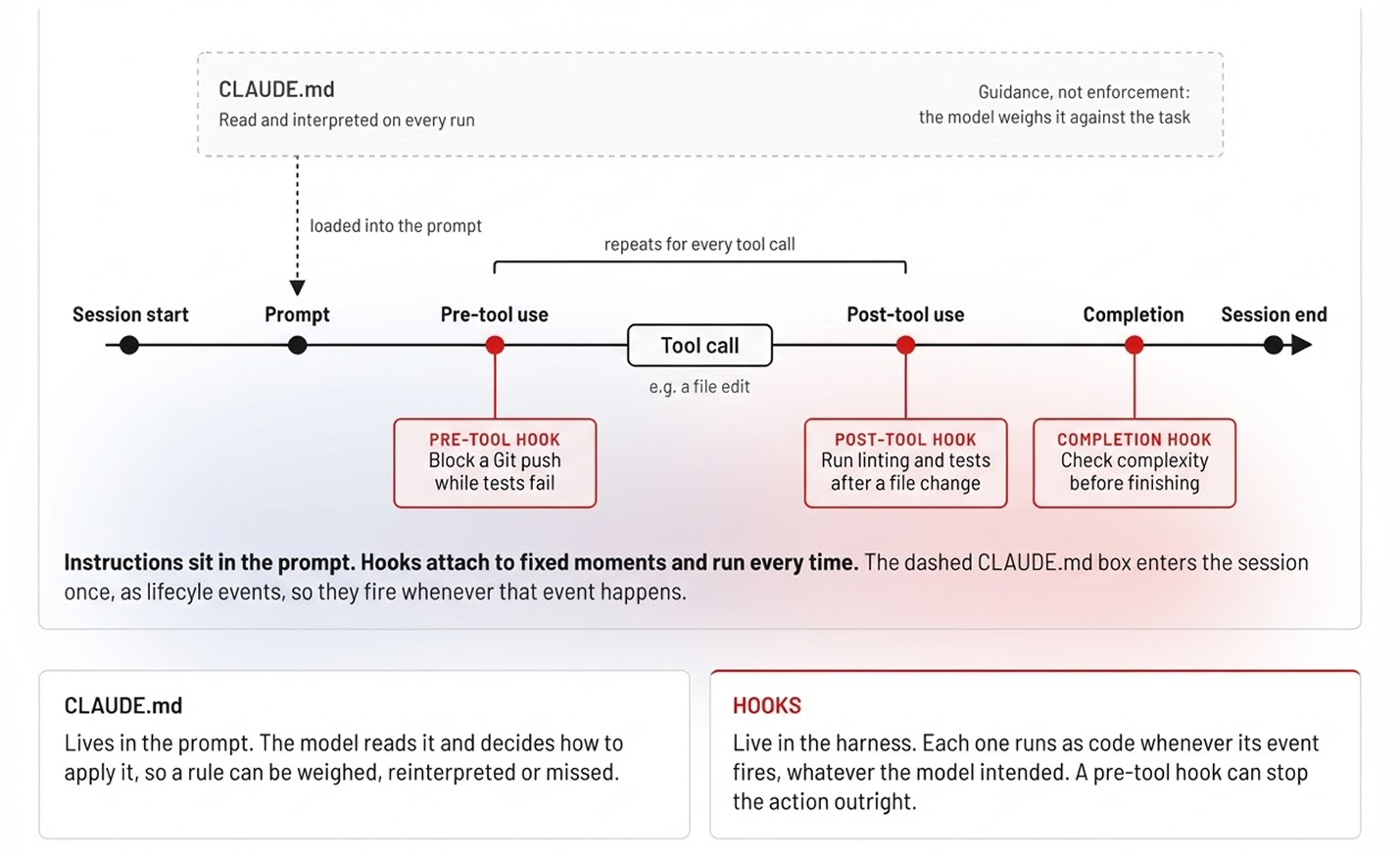
Take automated tests: for developers, tests are the safety net under the code: if they all pass after a change, the code works. So we give that safety net to the agent as well. After it builds something, it runs the tests. Green means done. Red means fix the problem and come back.
Written as an instruction, that step can still be skipped. Attached to a hook, it runs every time, and so does a rule like “never push to Git when tests fail”. Hooks can run linting, security scans, complexity checks, architectural constraints and policy validation in the same way. A session end hook could even send you a recap of what the agent did.
That’s what makes a hook a deterministic system: its script runs every time the lifecycle moment triggers, so the system enforces the rule and the agent no longer has to remember it.
Your harness becomes part of your engineering architecture
Which hooks you can use depends on the harness you work in. The harness determines which lifecycle events you can observe, where you can attach control.
A harness is more than just the interface you use to talk to an AI model:
- it determines which lifecycle events you can observe
- where you can attach controls
- which automation you can trigger
- how you can constrain what the agent does
Every harness handles this differently: Claude Code has its own lifecycle, and other harnesses such as Cursor have theirs.
So the harness decides which hooks and controls you can put around the agent. Which one fits also depends on who’s driving the agent. An experienced engineer usually wants to work directly in the codebase, with strong hooks and as much automation as possible. A product manager, or anyone less technical, gets more out of a workflow they can actually see, where every step is spelled out and guardrails keep the agent on track.
Not every piece of code needs reasoning (or a language model)
Once a hook enforces a rule, that rule can come out of the instruction file, so the agent stops paying for it on every run. There’s a bigger saving in code the agent doesn’t need to write at all.
Take a NestJS controller: ask the agent for one, and it writes every line itself. Yet the NestJS CLI can create that controller for you with one command, with the right name and everything that belongs in it, so the agent only codes on top. Run that two hundred times, and you’ve saved two hundred times the tokens. A hook can even enforce it: as soon as the agent creates a controller, it uses the CLI.
The same applies to generators, templates, scaffolding, libraries and reusable components. Whenever a tool already does the job, let it, and keep the model for the parts that need reasoning or judgement.
Component reuse follows the same logic
UI work follows the same pattern, with components instead of scaffolds. Let’s say the agent needs a combo box. A hierarchy is to (re)use existing internal components first, then approved ShadCN components, and build something custom only when neither meets the requirements.
You can explain that rule in a skill. However, you can also anchor it at several levels at once: the component library gives the agent reusable assets, validation flags components that aren’t allowed, and a hook can step in whenever the agent adds a new one.
As a result, the rule no longer depends on the agent remembering one sentence in a long instruction file.
A first check for your own rules file
Every one of these moves starts with the same question, and you can ask it of your own rules file today.
Open your CLAUDE.md and ask one question of every line: does this require reasoning, or can it be encoded into the system? Everything in the second group can move into tooling, code, hooks, CI, generators or architecture, and your prompt gets shorter with every rule you move.
That’s the step from prompting an agent to engineering an agentic development system.
What the series adds up to
In part 1, the developer answered the agent’s questions before any code existed, and a strong model planned the work so a light one could build it. In this article, the developer moved the fixed rules out of the prompt and into hooks, CLIs and CI. Both times, the agent wrote the code and the developer made the decisions.
Any team can give an agent a ticket today. However, the output becomes predictable once a developer builds those pieces around it. So for AI-native engineers, more of the work goes into that system than into writing code.
The best AI-native engineers leave the agent the least room to guess.